Airtable E-Signatur
Dokumente unterschreiben lassen, direkt aus Airtable
Schick Angebote, Verträge und Geheimhaltungsvereinbarungen direkt aus Airtable. Dein Kunde unterschreibt oder nimmt mit einem Klick an, und das versiegelte PDF landet wieder im selben Eintrag.









Warum Airtable-Teams mit DocsAutomator unterschreiben lassen
Eintrag rein, versiegeltes PDF zurück, alles in einem Tool
Das versiegelte PDF kommt zurück in den Eintrag
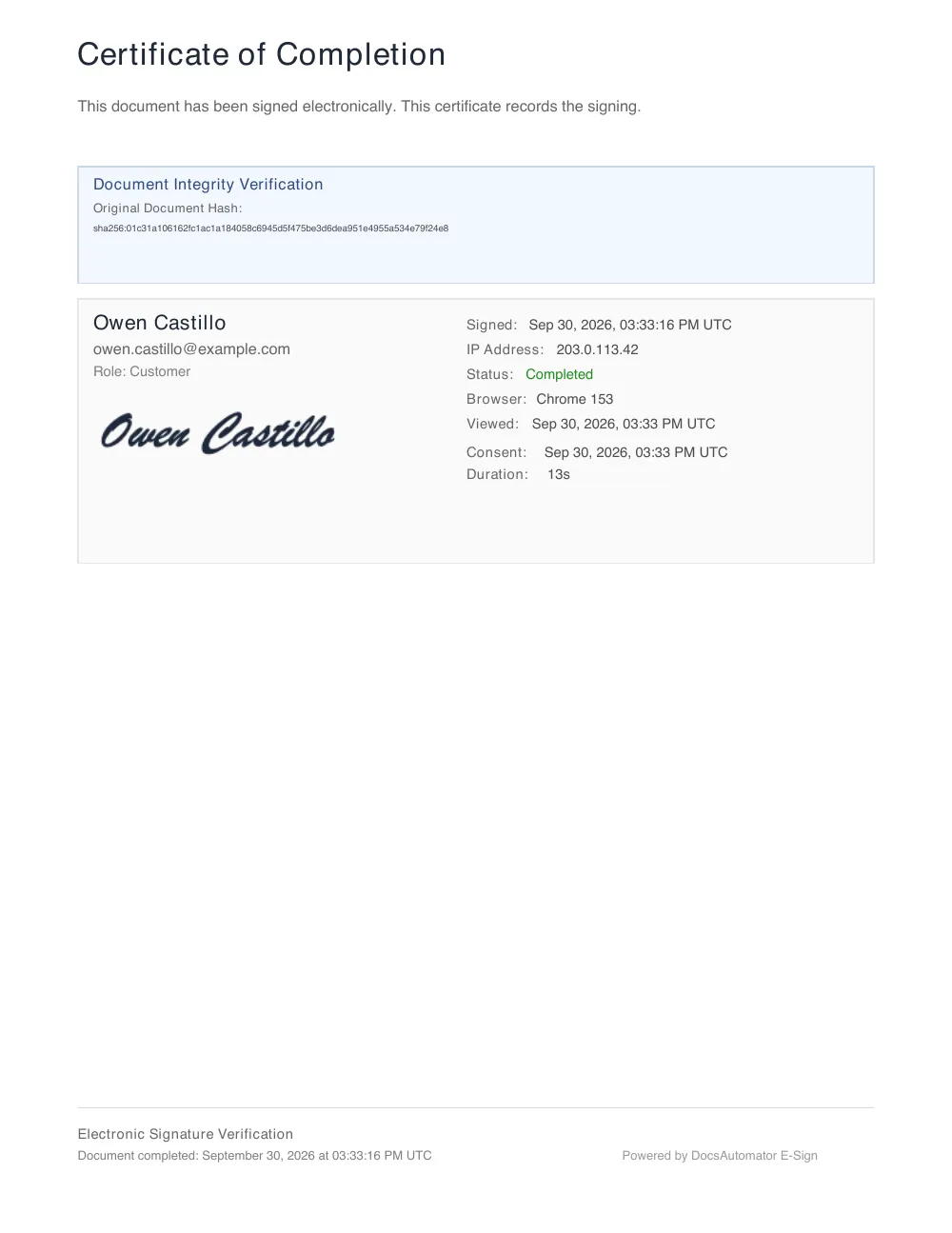
Es landet in dem Anhangsfeld, das du wählst, mit einer Zertifikatsseite.
Namen und E-Mail-Adressen stehen schon in deinen Feldern
DocsAutomator nimmt sie aus dem Eintrag. Du tippst sie nie neu ein.
Ein Tool statt zwei Abläufen in Zapier oder Make
Erstellen, verschicken und zurück in den Eintrag legen, in einem Schritt und ohne Zapier oder Make.
So verschickst du ein Dokument aus Airtable zur Unterschrift
Einmal einrichten. Danach erstellt DocsAutomator für jeden passenden Eintrag das Dokument, lässt es unterschreiben und legt das PDF zurück in den Eintrag.
- 1
Airtable verbinden
Verbinde in DocsAutomator dein Airtable-Konto und wähl die Base und die Tabelle, um die es im Dokument geht, zum Beispiel Angebote oder Lieferanten.
- 2
Signatur-Platzhalter in die Vorlage setzen
Nimm eine Google-Docs- oder Word-Vorlage mit Platzhaltern für deine Felder. Setz {{esign.signature_1}} dorthin, wo die erste Person unterschreibt, und {{esign.date_1}} dorthin, wo das Datum stehen soll.
- 3
Festlegen, wer unterschreibt
Schalte „Signing“ ein und nimm Name und E-Mail-Adresse jedes Unterzeichners aus Feldern des Eintrags. Mehrere Personen können gleichzeitig oder nacheinander unterschreiben.
- 4
Festlegen, wohin das versiegelte PDF geht
Wähl unter „After signing“ ein Anhangsfeld im Eintrag. Was der Unterzeichner ausfüllt, etwa ein Datum, einen Namen oder ein angekreuztes Kästchen, kannst du auch in Feldern speichern.
- 5
Aus Airtable starten
Starte den Ablauf mit einer Feldänderung, zum Beispiel mit dem Status „Vertrag senden“. Du kannst auch einen Button, eine Airtable-Automation oder die DocsAutomator-Erweiterung nutzen.
- 6
Der Unterzeichner unterschreibt, der Eintrag wird aktualisiert
Der Unterzeichner bekommt eine E-Mail, öffnet das Dokument am Handy oder am Computer und unterschreibt ohne Konto. Das versiegelte PDF mit Zertifikat landet im Anhangsfeld.
In wenigen Minuten zum ersten unterschriebenen Dokument
Diese Teams und Organisationen erstellen ihre Dokumente mit DocsAutomator:







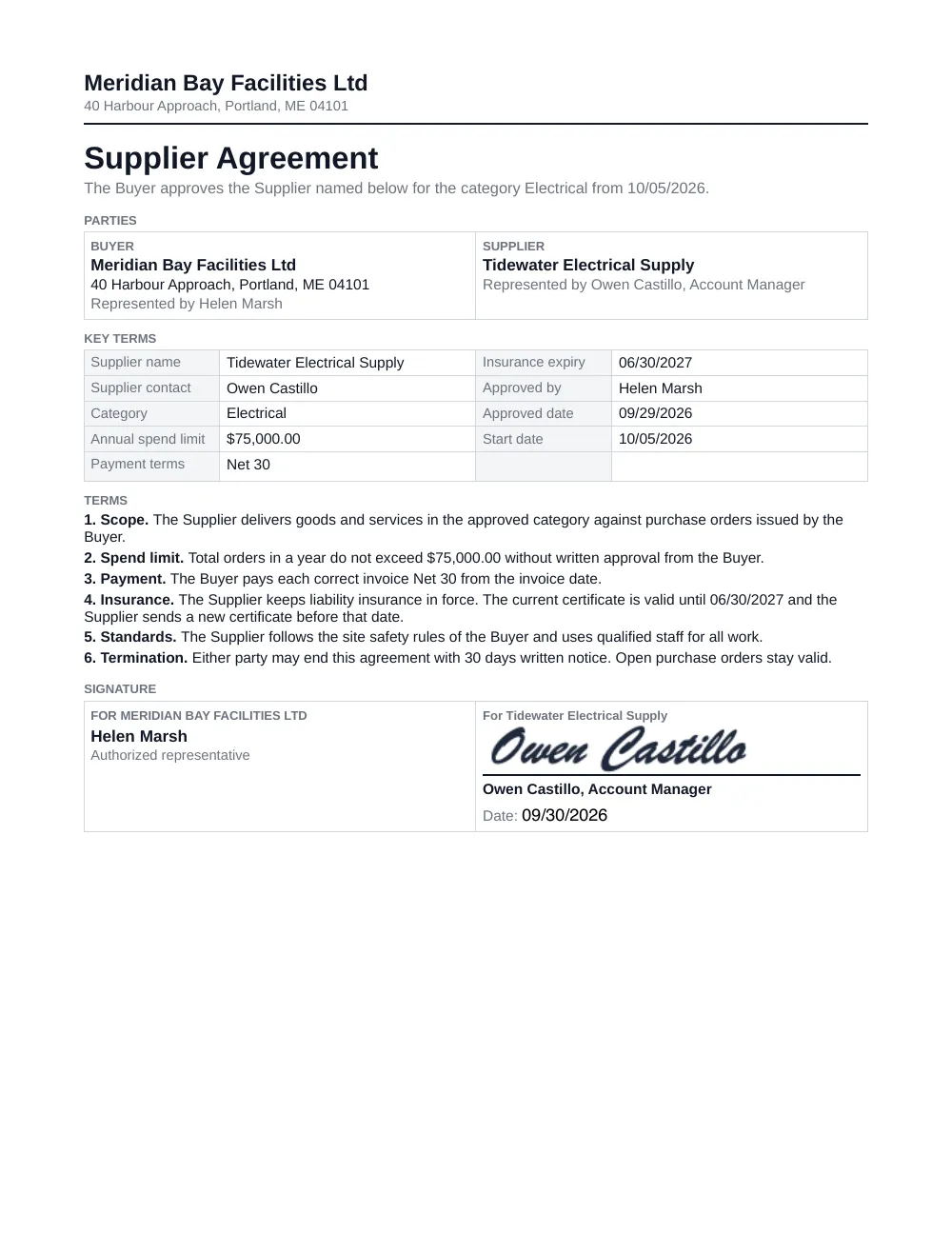
So sieht ein Liefervertrag aus Airtable aus
Aus dem Eintrag erstellt und auf einer Testseite unterschrieben. Alle Namen und Beträge sind erfunden, die Vorlage ist auf Englisch.
1. Der Eintrag in Airtable
- Status
- Vertrag senden
- Kontakt beim Lieferanten
- Owen Castillo
- Position des Kontakts
- Account Manager
- Kontakt-E-Mail
- owen.castillo@example.com
- Kategorie
- Elektro
- Jährliches Ausgabenlimit
- 75.000,00 $
- Zahlungsziel
- 30 Tage netto
- Versicherung gültig bis
- 30.06.2027
- Freigegeben von
- Helen Marsh
- Freigegeben am
- 29.09.2026
- Startdatum
- 05.10.2026
- Unterschriebener Liefervertrag
- Leer, bis der Lieferant unterschreibt
2. Deine Vorlage
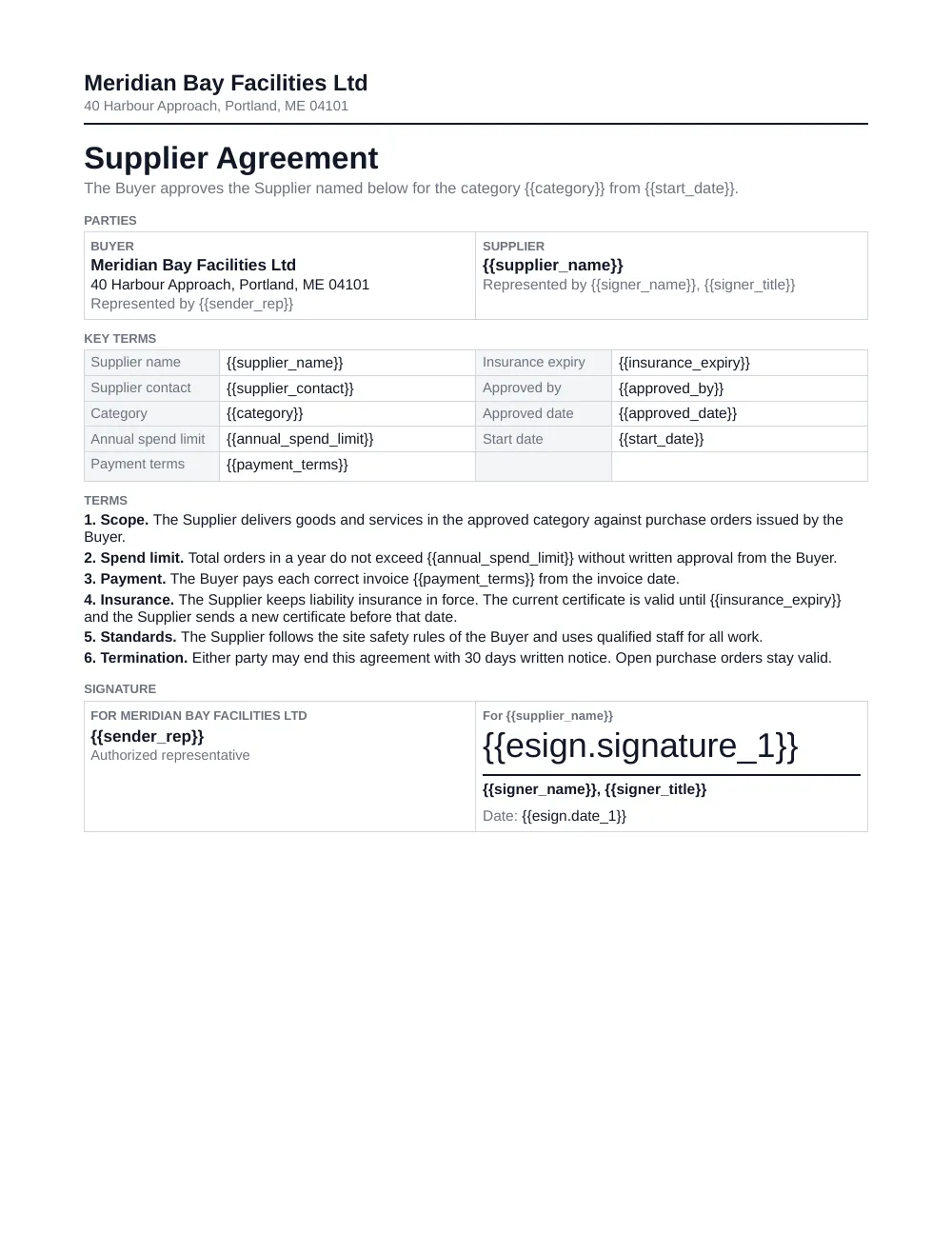
3. Das unterschriebene Dokument
Angebote mit einem Klick annehmen lassen
Bei einem Angebot oder einer Bestellung reicht ein Ja.
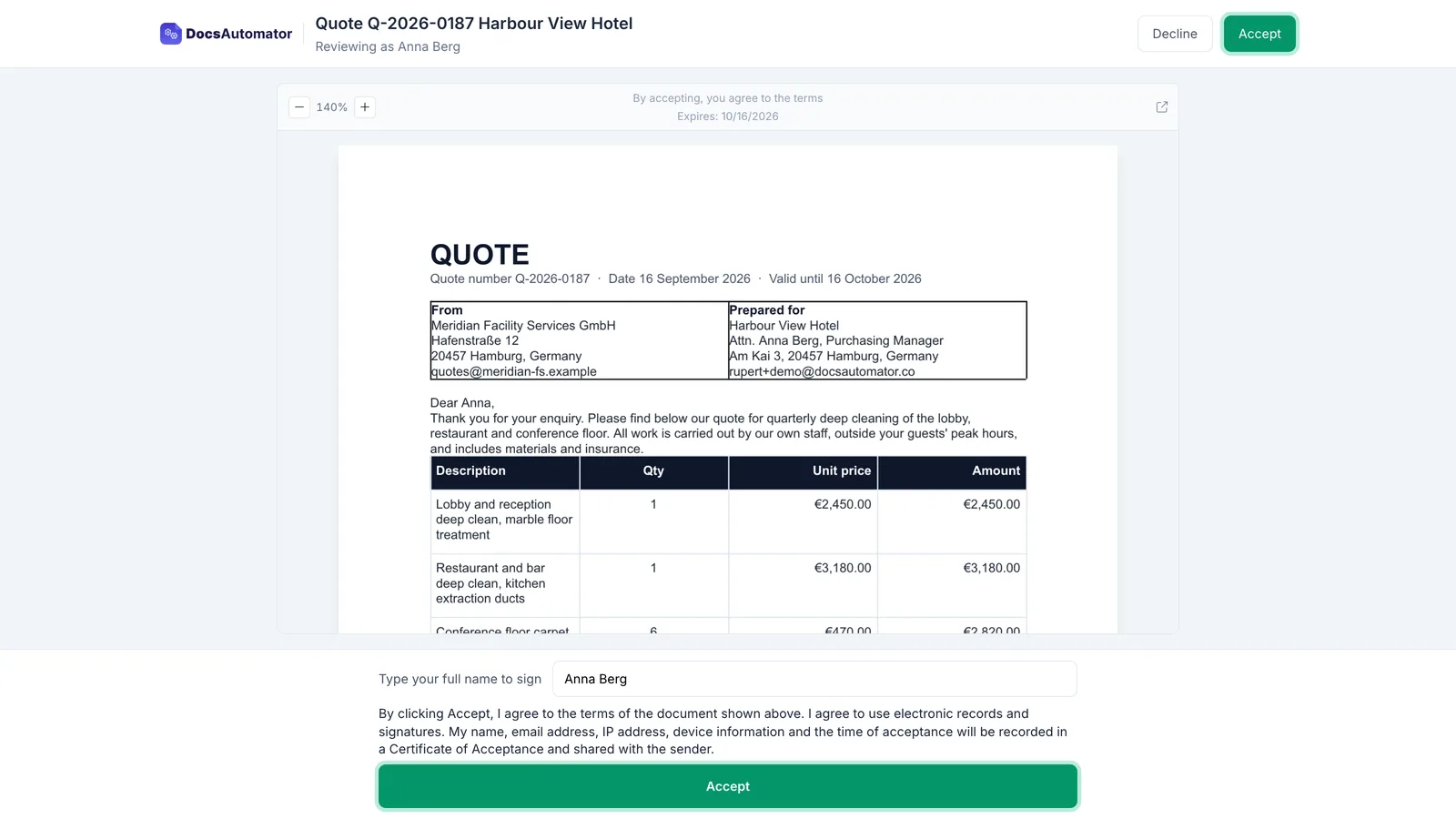
Wähl „Acceptance“ statt „Signing“. Dein Kunde öffnet das Angebot aus der E-Mail und klickt auf „Annehmen“.
- Nichts zeichnen, kein Konto anlegen
- Er kann seinen Namen eintippen oder mit Begründung ablehnen
- Das versiegelte PDF geht mit einem Annahmezertifikat zurück in den Eintrag
DocuSign oder PandaDoc mit Airtable nutzen
Keins der beiden hat eine Erweiterung im Airtable Marketplace (Stand Oktober 2026), deshalb verbinden Teams sie über Zapier oder Make.
So läuft es meistens, mit zwei Tools und zwei Abläufen in Zapier oder Make
Ein Ablauf schickt die Datei zur Unterschrift, ein zweiter bringt die unterschriebene Datei zurück.
Mit DocsAutomator in einem Schritt
Das Dokument entsteht aus dem Eintrag, geht raus und landet unterschrieben wieder im Eintrag.
Du kommst von einem anderen Signatur-Tool?
Ob DocuSign, PandaDoc oder ein anderes Tool: Unser Gründer holt deine Vorlagen und Abläufe persönlich mit dir rüber, ohne Aufpreis.
Gespräch buchenWorauf du bei einem E-Signatur-Tool für Airtable achten solltest
Sieben Punkte, die du vorher prüfen solltest.
- Das unterschriebene PDF kommt zurück in den Eintrag. Die unterschriebene Datei sollte ohne zweiten Ablauf in Zapier oder Make in einem Anhangsfeld landen.
- Namen und E-Mail-Adressen stehen schon in deinen Feldern. DocsAutomator sollte sie aus dem Eintrag nehmen, statt dass du sie für jede Anfrage neu eintippst.
- Positionen aus verknüpften Einträgen. Angebote und Bestellungen brauchen Zeilen aus verknüpften Tabellen, gruppiert und mit Summen.
- Vorlagen, die dein Team bearbeiten kann. Vorlagen in Google Docs, Word oder PDF, damit dein Team die Texte selbst ändern kann.
- Unterschrift und Annahme. Ein Vertrag braucht eine Unterschrift. Für ein Angebot reicht oft ein Ja.
- Kosten pro Person oder pro Unterschrift? Prüf, ob ein Tool für jedes Teammitglied einen bezahlten Zugang verlangt oder jede Unterschrift extra berechnet. Bei DocsAutomator sind Unterschrift und Annahme in jedem Plan enthalten, mit unbegrenzt vielen Teammitgliedern.
- Nachweis auf jedem PDF. Ein Zertifikat und ein Prüfprotokoll halten fest, wer wann mit welcher E-Mail-Adresse und auf welchem Gerät unterschrieben hat.
Fragen zur E-Signatur für Airtable
Kundenstimmen
Das sagen unsere Kunden, im englischen Original:
We have been using Airtable for a few years now and it has become our one source of truth. DocsAutomator has made this work for us by providing us with the ability to create documents in seconds instead of minutes or even hours. Game changer.

Jorge Peña
SVP, Delivery Operations, ZAGA.
Found DocsAutomator at the perfect time. Excited to see the ways that it saves me, and our company, time. Super simple to set up and use. Customer service was PROMPT, thorough, and helpful when I ran into some issues.

Cody Nailor
DocAutomator has helped my business automate invoices, contacts, and quarterly reports for our clients. This product saves us a lot of time, allowing us as a property management company to focus more on asset management.
Eran
I've just been looking for this app for weeks. DocsAutomator simply outperforms any competitor out there. I've tried almost every possible way to generate PDF from Airtable, and none offer half of the capacities DocsAutomator does.
Foulques de Moncade
After struggling with the limits and bugs of AirTable's Page Designer extension for years, I stumbled on the DocsAutomator tool – and I have to say – it's incredible.
Trashcaneron
I have been exploring various solutions to streamline my business operations. I found myself having to choose between design and automation. However, that is now a thing of the past, and I am finally able to utilize all of my Google templates.
Johanes Automated
Weitere Integrationen

Claude
Erstell Dokumente, lass sie unterschreiben und erstell E-Rechnungen im Chat mit Claude.

ChatGPT
Erstell Dokumente, lass sie unterschreiben und erstell E-Rechnungen im Chat mit ChatGPT.

Notion
In Notion hast du Wikis, Projekte und dein ganzes Geschäft an einem Ort.

Google Sheets
Google Sheets ist die Tabellenkalkulation in der Cloud, in der dein Team gleichzeitig arbeitet.

Google Forms
Mit Google Forms erstellst du kostenlos Formulare und sammelst Antworten an einem Ort.

Glide
Mit Glide baust du eigene Business-Apps aus deinen Daten, ganz ohne Code.

Softr
Mit Softr baust du aus verstreuten Daten und Abläufen eigene Software für dein Geschäft, auch mit KI.

SmartSuite
SmartSuite ersetzt viele Einzeltools durch eine Plattform, die mit jedem Team wächst.

Noloco
Mit Noloco baust du schnell interne Tools, Kundenportale und CRMs.

ClickUp
In ClickUp organisiert dein Team Aufgaben, Dokumente und Dashboards an einem Ort.

Zapier
Mit Zapier automatisierst du einzelne Aufgaben oder ganze Abläufe.

n8n
Flexible KI-Workflows für technische Teams.

Make
Abläufe mit KI, die du visuell baust und live steuerst.

API
Verbinde deine eigene App über unsere API und nutze DocsAutomator direkt.
Lass dein erstes Dokument aus Airtable unterschreiben.
Über 1.200 Unternehmen sparen mit DocsAutomator Stunden bei ihren Dokumenten.

Unbegrenzt testen, ohne Kreditkarte.