Personalization expectations from clients starts from the very beginning — including when you prepare your proposal document. Doing this manually isn’t scalable, especially if you’re implementing campaigns like cold emailing or ads for agency lead generation. This reliance on manual document creation automation is not merely an administrative bottleneck. It is a systemic vulnerability that leaks revenue, erodes brand equity, and introduces fatal compliance risks.
With simple document automation workflows, you can avoid ten most critical mistakes agencies commit during the manual proposal generation process.
For this automation, we will use document automation solutions DocsAutomator. It connects with Airtable, Google Sheets, ClickUp, SmartSuite, Zapier, and more.
Irrespective of existing project management or lead generation tools you use, DocsAutomator can help you increase win rates, reduce operational overhead, and ensure absolute data integrity — read to learn more.
Understanding the Operational Context of the Modern Agency for Proposal Documentation
To understand the gravity of proposal mistakes, one must first appreciate the environment in which they occur.
The modern agency is a high-velocity environment where the ‘speed to lead’ often dictates the winner. However, this speed is frequently checked by the friction of manual administration.
The Paradox of the ‘Crafted’ Proposal
Agencies often resist document process automation software under the mistaken belief that automation equals depersonalization.
Document automation enables personalization, and does not suppress it.
The prevailing myth is that a manually written document is ‘crafted’ and therefore superior. In reality, the manual process is often characterized by copying and pasting from previous versions, hunting for logos, and manually calculating fee tables. This consumes the mental energy that should be spent on strategy. The result is a document that is technically flawed and strategically generic.
The Rise of the Connected Tech Stack
The agency ecosystem has matured with easy to use SaaS and no-code software:
- Client data lives in CRMs (HubSpot, Salesforce)
- Project data lives in management tools (ClickUp, Asana)
- Financial data lives in ERPs or spreadsheets (Airtable, SmartSuite)
The manual proposal writer acts as a human API, attempting to manually transfer data between these systems and a static Word document. This disconnect is the root cause of the errors.
Project management or CRM document automation bridges this gap, ensuring that the proposal is a direct reflection of the system of record.
The Data Integrity Crisis for Agency Document Automation
The first cluster of mistakes relates to the fundamental accuracy of the document. These are errors of execution—mistakes that occur not because the agency lacks strategy, but because the mechanism of delivery is flawed.
Manual data entry is the primary culprit, introducing human error into mission-critical documents.
Mistake 1: The ‘Find and Replace’ Issue (or Data Residue)
The most ubiquitous and damaging error in agency proposals is the failure to completely sanitize a document of previous client data.
For example, this occurs when an account executive opens the proposal sent to ‘Client A’, saves it as ‘Client B,’ and attempts to manually locate and overwrite specific details. No potential client is going to like reading a competitor name mentioned!
The human error is natural, afterall, a proposal writer must scan 20+ pages of text to identify every instance of the client's name, industry, and specific pain points.
The Document Automation Solution: Variable Mapping
Document automation software like DocsAutomator eliminates this mistake by inverting the workflow. Instead of editing a static document, the agency maintains a dynamic template.
In the DocsAutomator ecosystem, this is achieved through variable mapping:
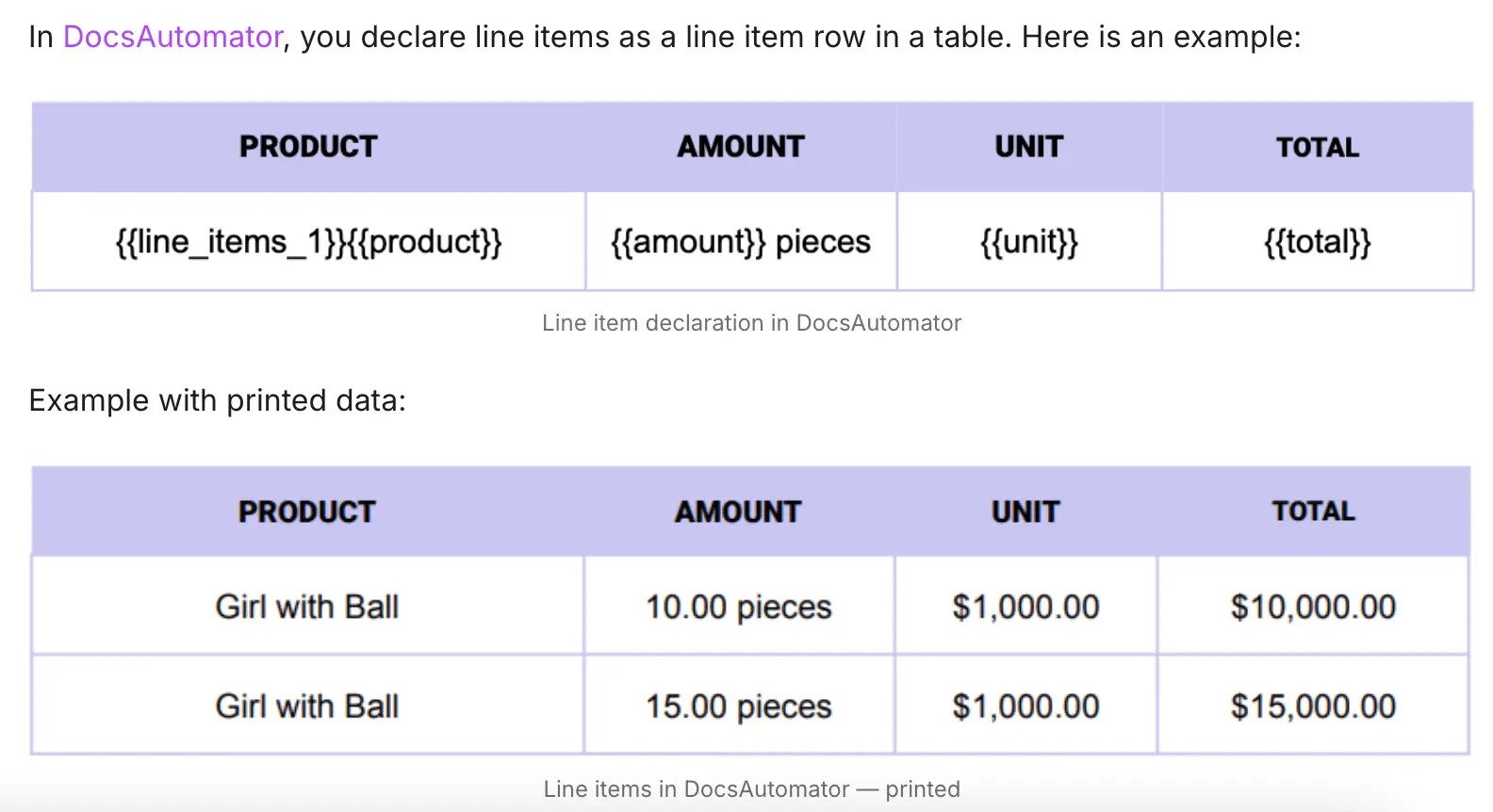
- Design Template: You can create a ‘Proposal Template' in Google Docs or use the many available proposal templates by DocsAutomator. Instead of typing ‘Acme Corp,’ the template uses specific syntax: {{client_name}}.
- Add Data: The data lives in a structured source, such as Airtable, Glide, or ClickUp. When the automation runs, the software programmatically locates every instance of {{client_name}} and replaces it with the data from the record.
With simple variable mapping from your database to proposal document template, Zero-Error is Guaranteed.
Because the process is algorithmic, it is impossible for the system to ‘miss’ a placeholder. If the data exists in the CRM, it appears correctly in the document. This ensures that 100% of the client-specific variables are updated simultaneously, removing the risk of human oversight.
Mistake 2: The Compliance and Formatting Drift
Agencies frequently respond to Requests for Proposals (RFPs), particularly in the government, healthcare, and enterprise sectors. These solicitations often come with rigid compliance requirements regarding formatting. One has to take care of margins, font sizes, page numbering, and file naming conventions. Efficient law firm document automation and government proposal strategies emphasize that compliance is a pass/fail gate.
For example, in a manual environment, multiple team members collaborate on a document. Copying and pasting sections from different sources (Word docs, emails, PDFs), the document's underlying styles corrupt. This leads to fonts changing mid-paragraph, inconsistent headers, and spacing varies.
The Document Automation Solution: Controlled Google Doc Templates
DocsAutomator uses Google Docs as the template engine. This allows for strict control over formatting while enabling dynamic content generation.
- Enforced Styles: By building a master template in Google Docs, you can define the exact margins, headers, footers, and typography required by the RFP or brand guidelines.
- Sanitized Input: When automation pulls data from a database (like a description of services from Airtable), it injects that text into the pre-defined styles of the Google Doc. The text adopts the formatting of the destination placeholder. This ensures that no matter where the source data originated, the final output is visually uniform.
- Standardized Structure: Agencies can create specific templates for different regulatory environments (e.g., ‘Federal Proposal Template,’ ‘Enterprise SaaS Template’). This ensures that the starting point for every proposal is a compliant, legally vetted structure, rather than the last document the sales rep happened to work on.
Mistake 3: Legal Exposure via Obsolete Clauses
For agencies that operate in regulated industries or offer complex financial document automation services, the legal terms within a proposal are as critical as the price. A common mistake is the inclusion of outdated legal clauses or the omission of necessary disclaimers.
For example, as legal language evolves, you might update Terms of Service (ToS) to reflect new privacy laws (GDPR, CCPA) or new liability limits. However, if a sales representative is ‘recycling’ a proposal from 2023 for a 2025 pitch, they will inadvertently include the old legal language. This exposes the agency to significant liability.
The Document Automation Solution: The Centralized Clause Library
Using customizable document automation for lawyers and agencies, the legal text is treated as a data object, not static text.
You can create Database-Driven Clauses.
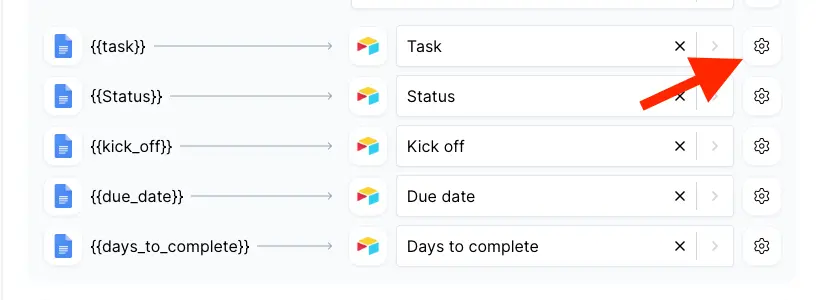
Here, legal clauses are stored in the database (e.g., Airtable or SmartSuite). When the proposal is generated, the system pulls the current version of the clause.
Result: The sales team never has to ‘remember’ to add the privacy rider; the automated document assembly system handles it based on the data profile of the client.
The Financial Mistakes During Proposal Document Creation
The second cluster of mistakes relates to the financial mechanics of the proposal. These errors directly impact the bottom line, leading to under-pricing, scope creep, and billing disputes.
Mistake 4: Calculation Errors in Pricing Tables
Perhaps the most financially dangerous mistake is the calculation error. Proposals often contain pricing tables, fee schedules, or lists of deliverables. In a manual workflow, these are often static tables where the totals are calculated by hand or copied from a spreadsheet. These may have been updated since the copy-paste occurred.
For example, you can have broken formulas – where a sales rep adjusts a quantity in a Word table, the "Total" column does not update automatically.
One can also experience complexity limits as manual tables struggle with variable length. If Client A needs 3 items and Client B needs 50 items, the manual user must laboriously add rows and format them one by one, increasing the likelihood of alignment errors.
The Document Automation Solution: Dynamic Line Items and Loops
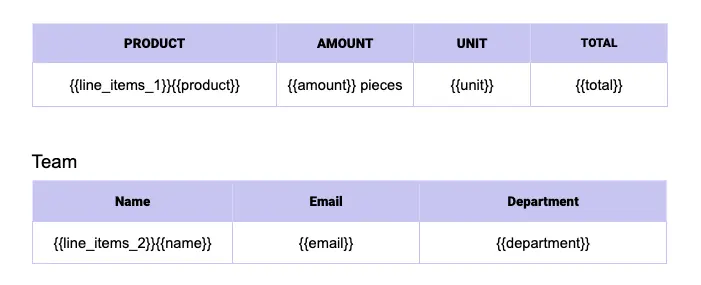
This is where document automation solutions move from simple text replacement to complex data processing. DocsAutomator introduces the concept of Line Items to handle variable-length lists of data.
- The Loop Mechanism: Instead of creating a fixed table with 10 rows, the user creates a single ‘Line Item Row’ in the template using syntax like {{line_items_1}}.
- Database Integration: The agency stores the pricing line items in a dedicated table in their database (e.g., an ‘Items’ table in Airtable linked to the ‘Proposal’ record).
- Automated Iteration: When the document is generated, DocsAutomator looks at the linked records. If there are 5 items, it generates 5 rows. If there are 50, it generates 50.
- Calculation Integrity: The calculations (Unit Price × Quantity = Total) are performed in the database (Airtable/SmartSuite), which is built for math. The document automation simply displays the result. This decouples the calculation from the presentation, ensuring that the math in the proposal is always as accurate as the data in the system.
Mistake 5: Vague Scope Definitions (Scope Creep)
Scope creep is the silent killer of agency profitability. It almost always stems from a proposal that was insufficiently detailed in its definitions of deliverables.
For example, writing detailed specs is tedious. A manual writer, pressed for time, will write ‘Website Development’ as a single line item. Later, the client assumes this includes SEO, Content Writing, and 5 years of hosting. The agency assumes it means ‘Code only.’
The Document Automation Solution: The Structured SOW
Document builder software allows agencies to ‘productize’ their services in the database:
- Catalog-Based Scoping: The agency builds a ‘Service Catalog’ in Airtable/ClickUp. Each service record has a pre-written, detailed description, a list of inclusions, and a list of exclusions.
- Detailed Output: When the sales rep selects ‘Website Package A’ in the database, DocsAutomator pulls the full 500-word description, the ‘3 Rounds of Revisions’ clause, and the ‘Hosting Not Included’ disclaimer into the proposal.
- Consistency: Every client who buys ‘Website Package A’ gets the exact same detailed scope, protecting the delivery team from "he said/she said" disputes.
Mistake 6: Inconsistent Pricing Models
In larger agencies, different sales reps may use different pricing models (hourly vs. fixed fee vs. retainer) based on personal preference or outdated rate cards. This leads to internal confusion and financial inconsistency.
For example, Sales Rep A uses the 2022 rate card saved on their desktop. Sales Rep B uses the 2024 rate card. Reps may also manually override prices in Word documents to close deals, without tracking the discount in the financial system.
The Document Automation Solution: Locked Pricing Logic
Banking financial document automation principles apply here. The pricing logic should be centralized and immutable in the document generation phase.
- Database-Controlled Rates: The document automation tool pulls the price from the ‘Master Rate Card’ in the database. The sales rep cannot edit the price in the document generation process; they can only apply a ‘Discount’ field in the database if authorized.
- Transparency: Any discount applied is visible in the data record, allowing management to track the ‘Average Discount Rate’ across the agency—a metric impossible to track when discounts are buried in static PDFs.
The Brand and Personalization Dilemma
The third cluster of mistakes addresses the tension between efficiency and quality. Agencies often sacrifice personalization to save time, or sacrifice brand consistency due to lack of control.
Mistake 7: The ‘Generic Content’ Trap (Boilerplate Overload)
Agencies often fall into the trap of overloading proposals with generic content to make them look substantial. ‘Boilerplate’ is easily spotted by clients and signals laziness. If the content isn't tailored to the specific solicitation, it comes across as irrelevant.
For example, a standard ‘Marketing Proposal’ Word doc might contain descriptions for SEO, PPC, and Social Media. If a client only wants SEO, the manual user might leave the other sections in ‘just in case,’ or clumsily delete them, leaving gaps.
The Document Automation Solution: Conditional Logic
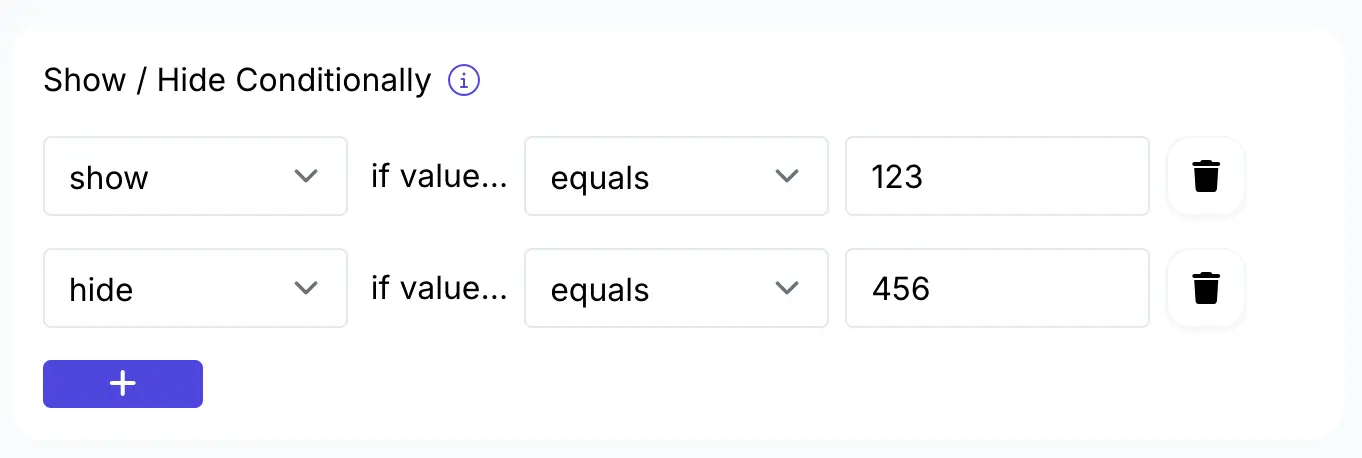
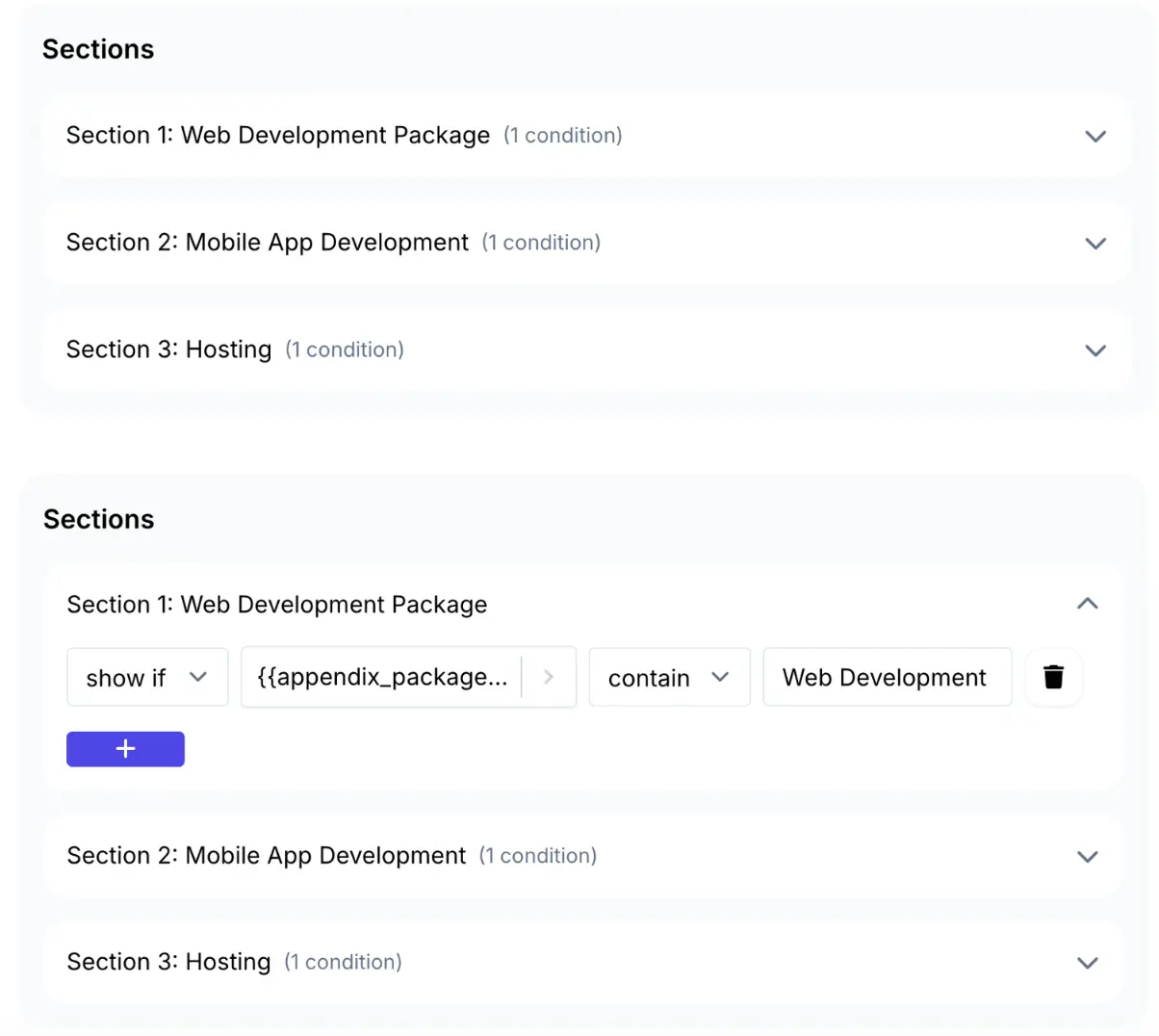
Intelligent document automation allows for sophisticated Conditional Logic (Show/Hide functionality) within the document generation process.
- Dynamic Sections: The template can be programmed to include specific sections only if certain criteria are met in the data.
- Example: If Service_Type = "SEO", print the "SEO Methodology" section. If Service_Type!= "PPC", hide the "Ad Spend Schedule" section.
- Tailored Case Studies: Logic can control which case studies appear. If Client_Industry = "Healthcare", the automation inserts the "Hospital System Case Study." If Client_Industry = "Retail", it inserts the "E-commerce Case Study."
- Impact: The resulting document feels 100% bespoke to the client's needs, free of irrelevant fluff, without the user having to manually curate the content every time.
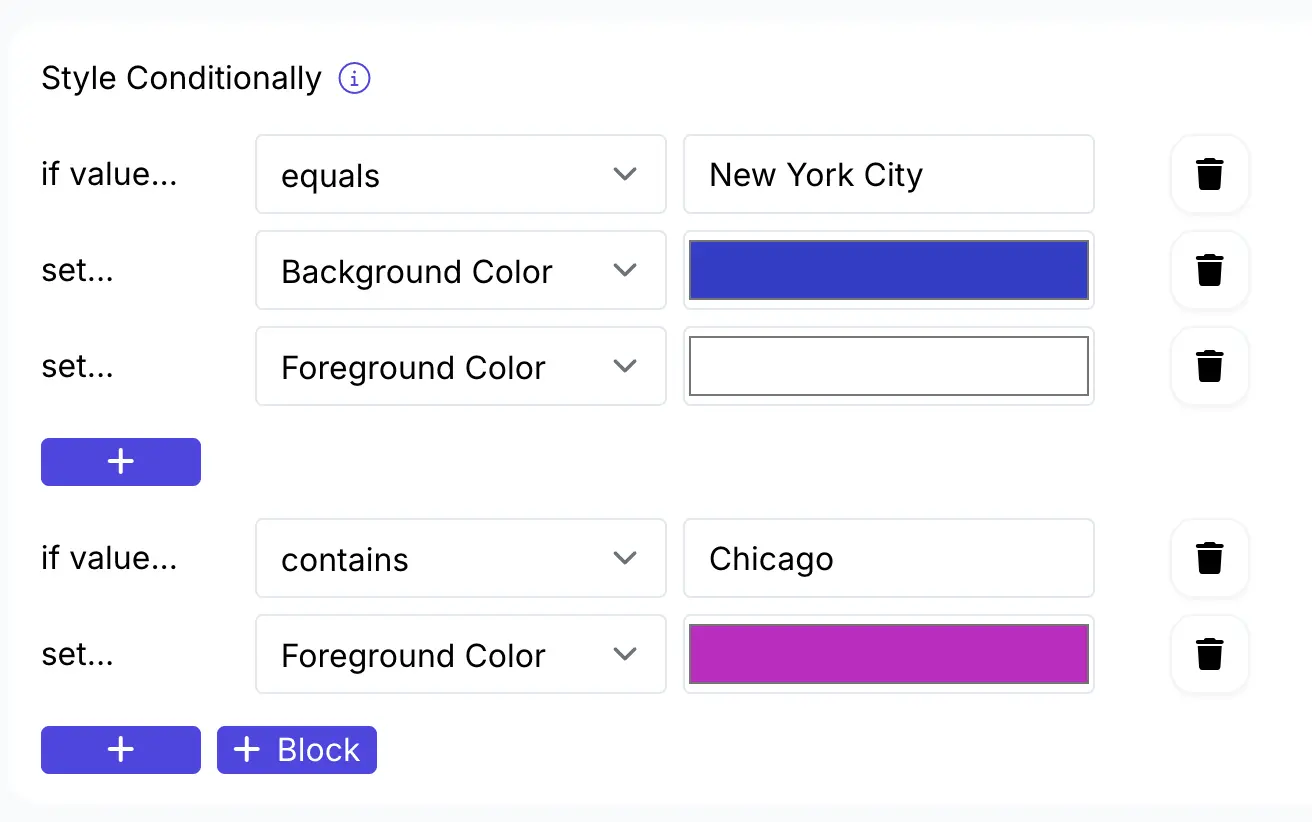
DocsAutomator makes this very easy with dropdown options available to set up the logic:
Mistake 8: Inconsistent Visual Identity (Brand Erosion)
A proposal is a piece of marketing collateral. Inconsistent branding with stretched logos, wrong colors, pixelated images, erodes trust.
For example, dragging and dropping images into Word often results in distorted aspect ratios. When working with multiple vendors or freelancers, or even different departments within an agency, the use of different template versions leads to a fragmented brand look.
The Document Automation Solution: Dynamic Image Handling
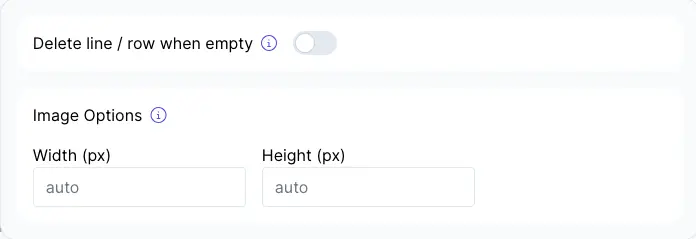
DocsAutomator utilizes specific syntax ({{image_variable}}) to manage visual assets dynamically.
- Aspect Ratio Preservation: The software automatically resizes images to fit placeholders while maintaining aspect ratios. If a user uploads a headshot or a product image to the database, the automation ensures it fits perfectly into the designated circle or square in the proposal.
- Centralized Assets: By pulling images from a central database (e.g., a ‘Team Bios’ table with headshots), the agency ensures that high-resolution, approved images are always used, rather than low-res versions scraped from LinkedIn and pasted into Word.
- Visual Uniformity: Every proposal generated adheres strictly to the brand's typography and layout defined in the Master Google Doc, ensuring that a proposal sent by a junior salesperson looks just as professional as one sent by the CEO.
The Operational Drag
The final cluster of mistakes involves the alignment of the proposal with the actual execution of the project and the technical infrastructure of the agency.
Mistake 9: The "Speed to Lead" Failure (Turnaround Latency)
Speed is a critical factor in closing deals. Data suggests that reducing turnaround times on proposals significantly improves the chances of closing deals. However, manual drafting is inherently slow.
For example, you have to gather the relevant case studies, bios, and pricing that can take hours or days. When the draft is due, it circulates via email for approval, adding more latency. By the time the proposal reaches the prospect (3-5 days later), the emotional momentum of the sales meeting has dissipated, or a competitor who automated their process has already submitted a bid.
The Document Automation Solution: Automate sending
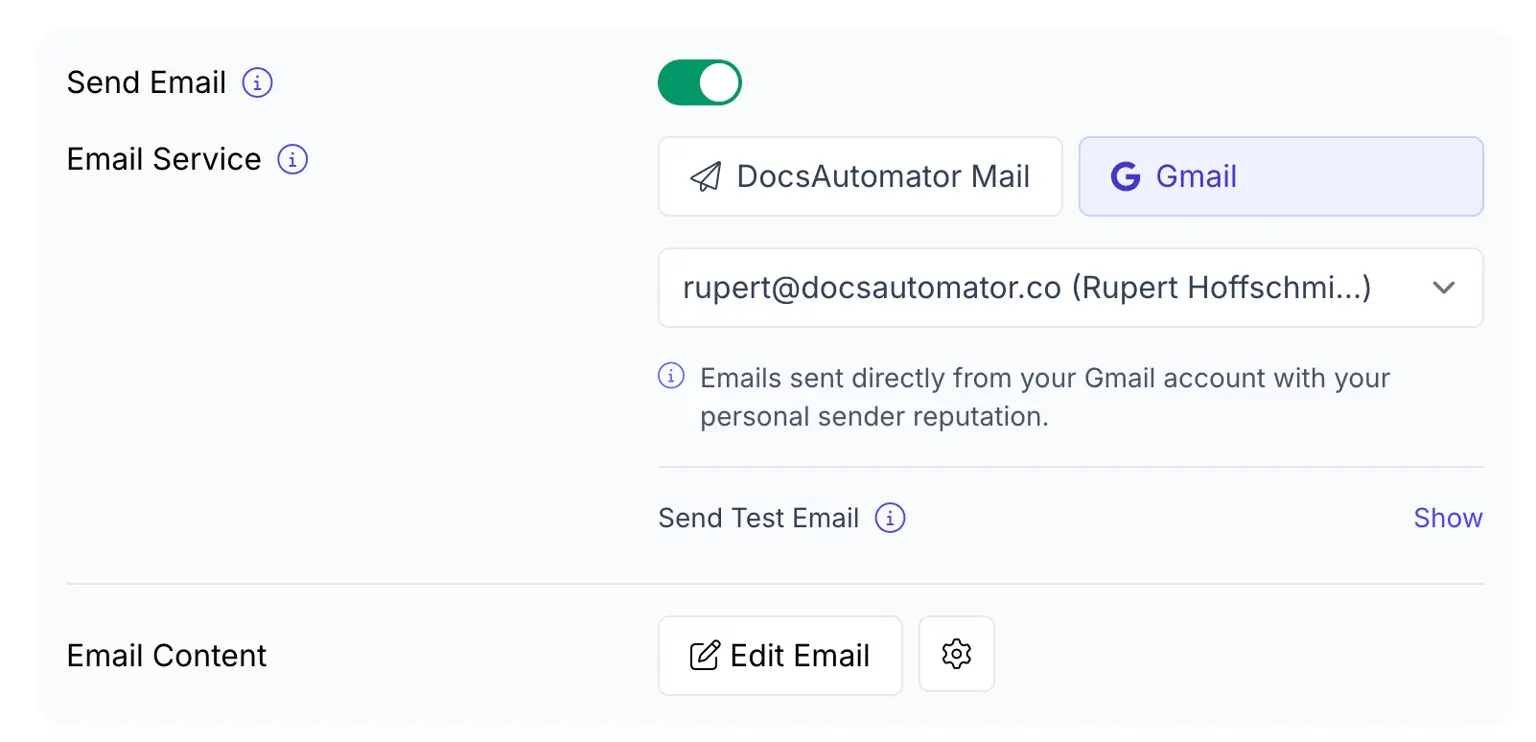
Document creation automation compresses the "creation" phase from hours to seconds:
- One-Click Trigger: DocsAutomator allows you to send your proposal document directly via email (GMail or DocsAutomator Mail). You can even edit the email and send – learn more
- Pre-Approved Content: Because the template draws from a library of approved content, the need for extensive internal review is reduced. The variable data (pricing, client name) is reviewed in the database, not the document.
- Throughput: Agencies can handle larger scales of proposal production without adding headcount. Automation allows teams to generate first drafts in seconds.
Here’s a video on how to use the ‘send email’ feature on DocAutomator:
Mistake 10: Disconnected Tech Stacks (Siloed Data)
Agencies often suffer from data silos. The CRM holds client contact info, the Project Management tool holds the scope, and the financial software holds the pricing. Manual proposals require opening all three to aggregate data.
For example, data must be manually moved between systems, leading to sync errors (e.g., the price in the accounting software doesn't match the price in the proposal). The effort required to gather this data discourages comprehensive proposals.
The Document Automation Solution: The Integration Hub
DocsAutomator acts as the bridge between these silos via its extensive integration capabilities.
- Unified Output: Through tools like Zapier or direct integrations with Airtable and SmartSuite (and many more listed here), DocsAutomator can pull data from multiple fields and tables into a single Google Doc.
- API Flexibility: For custom setups, the API integration allows agencies to build custom apps (e.g., a client portal) that trigger document generation, connecting any custom data source to the document engine.
This creates a ‘Connected Agency’ where the proposal is the result of a unified data flow, not a manual collage of disparate information.
Implementing DocsAutomator for Document Automation
Understanding the mistakes is only half the battle. The practical implementation of a document automation system requires a clear understanding of the tools available.
DocsAutomator stands out as a solution for agencies due to its integration with the ‘No-Code’ stack and its use of Google Docs as a template engine.
1. The Template Engine: Google Docs
The choice of Google Docs as the template source is a strategic advantage for agencies. Unlike legacy document automation tools that require proprietary editors, Google Docs is universally understood.
Teams can collaborate on the template design using standard Google features (comments, suggestions) before ‘locking’ it for automation.
Explore our collection of DocsAutomator templates or contact us to help you create a custom template via our Template Creation Service.
2. The Data Layer: Line Items and Nesting
The handling of Line Items is critical for proposals (SOWs, Pricing, Deliverables).
Syntax: {{line_items_1}} declares a row as a repeater.
Grouping: DocsAutomator supports nested line items (items within items) and also allows for grouping and calculations. This feature is essential for breaking down budgets by phases (e.g., "Phase 1: Discovery" total vs. "Phase 2: Execution" total).
Learn more about Nested Line Items here:
Mapping: The mapping interface allows users to connect fields from the data source (e.g., Airtable View) directly to the template placeholders, providing a visual confirmation of the data flow.
3. Integration Ecosystem
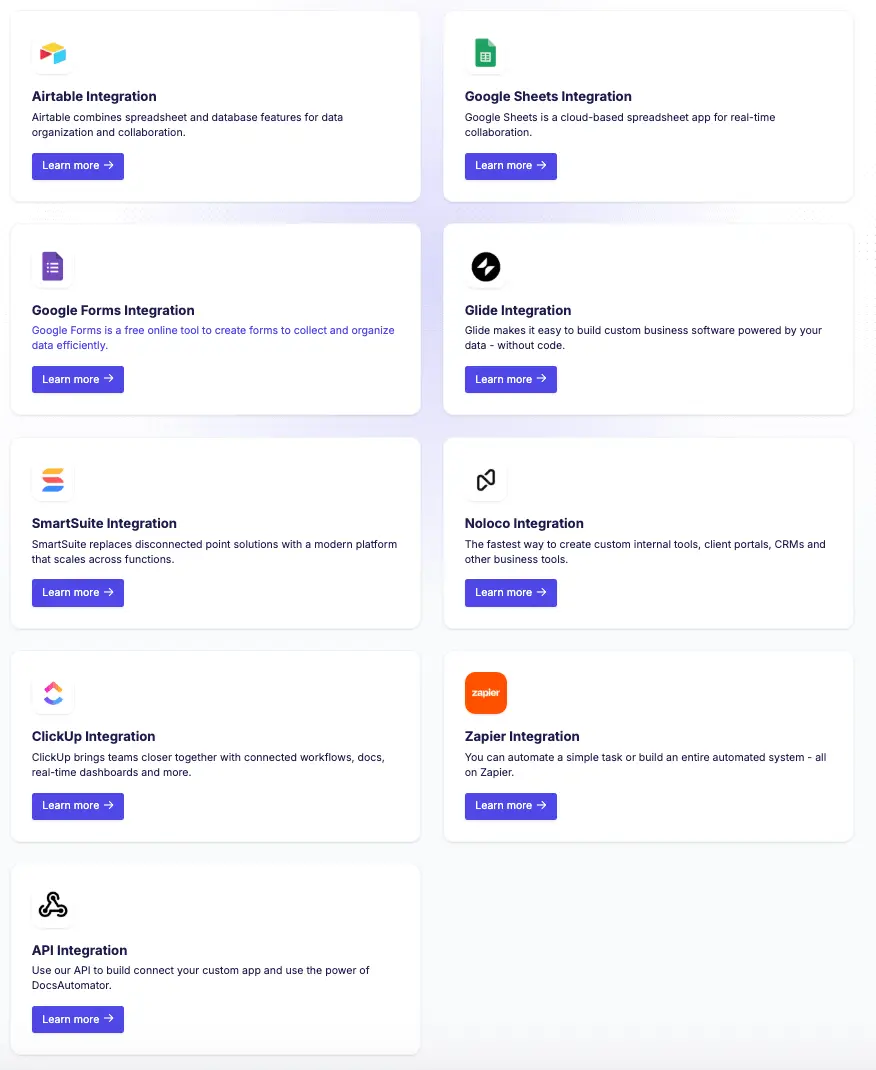
The power of DocsAutomator lies in its connectivity. It is not a standalone silo; it is a processor of data from other systems.
- Airtable Integration: Ideal for agencies that manage their CRM and Project Data in Airtable. It allows for rich data types like linked records (Line Items) and attachments (Images) to flow seamlessly into the doc.
- ClickUp Integration: Essential for operations-focused agencies. A task in ClickUp representing a "Lead" can trigger a proposal generation, pulling custom fields into the document.
- Zapier Integration: This serves as the universal adapter. Any app that connects to Zapier (Salesforce, Pipedrive, QuickBooks) can theoretically trigger a DocsAutomator workflow.
- Glide/Noloco Integration: These allow agencies to build "Internal Tools" or "Portals." A sales rep can open a Glide app on their phone, tap "Send Proposal," and the automation runs in the background.
Get started with DocsAutomator for Proposal Document Creation
The transition from manual proposal writing to automated document assembly is a fundamental shift in agency operations.
The ten mistakes outlined, from the embarrassment of ‘Data Residue’ to the profitability drain of ‘Scope Creep’—are not inevitable. They are symptoms of a broken process. By adopting document automation solutions like DocsAutomator, agencies can cure these symptoms at the source.
Recommendations for Implementation for higher win rates and low administration cost with document automation:
- Audit Your Mistakes: Review the last 20 proposals sent. Identify how many contained "data residue," formatting errors, or generic boilerplate.
- Centralize Your Data: Move pricing, team bios, and case studies out of scattered Word docs and into a structured database (Airtable/SmartSuite).
- Standardize Templates: Create a "Master" Google Doc that contains 100% of the potential content, then use Conditional Logic to subtract what isn't needed for each specific client.
- Leverage Integrations: Connect your CRM to DocsAutomator via Zapier or direct integration to eliminate manual data entry.
- Start Small: Begin by automating a simple document (e.g., an NDA or a simple Quote) using free Google Doc Proposal templates to validate the workflow before tackling the full Proposal/SOW.
The tools to eliminate these costly mistakes exist today. It is time for agencies to stop copy-pasting their way to the bottom and start automating their way to the top.
At DocsAutomator, we offer a 50% discount for non-profits and educational institutions as well. We also help create Google Doc templates at only $99 per template.
Getting started is also free to test out DocsAutomator: Create first 20 documents for free